
Learning how to program a garage door opener can save time and make everyday home access more convenient. Whether you have purchased a new remote, replaced an old keypad, or moved into a new house, programming your garage door opener is often a straightforward process. Most modern systems include a learning or pairing feature that allows compatible devices to connect without complicated technical work.
However, programming instructions vary depending on the opener’s brand, model, and security technology. Understanding the correct process can help prevent connection problems, accidental setting changes, and unnecessary frustration. This guide explains how to program a garage door opener, connect remotes and keypads, troubleshoot common issues, and keep your garage access system working safely.
What Does Programming a Garage Door Opener Mean?
Programming a garage door opener means connecting a compatible remote control, wireless keypad, or other authorized device to the motorized opener system. Once paired, the accessory can send a recognized signal that tells the opener to operate the garage door. This process allows homeowners to control access conveniently without manually operating the door each time.
Most modern garage door openers use wireless communication and security features designed to recognize authorized devices. Some systems use rolling-code technology, which changes the transmitted security code during normal operation. This helps protect against simple signal replay, although the exact security features depend on the manufacturer, model, and generation of the opener.
Programming usually involves placing the garage door opener into a learning mode and following the manufacturer’s pairing instructions. The procedure may take only a short time when the devices are compatible and functioning correctly. However, some older systems use different programming methods, making it important to identify your equipment before beginning.
Things to Check Before Programming Your Garage Door Opener
Before programming, identify the manufacturer and model number of your garage door opener. This information is often located on a label attached to the motor housing or inside the equipment’s documentation. Knowing the model helps you find the correct instructions and determine which remote controls, keypads, and accessories are compatible.
Next, inspect the remote control and confirm that its battery is working properly. A weak or incorrectly installed battery can prevent successful pairing, even when the programming steps are correct. Also check that the opener has power and that its normal operating controls function without any unusual problems.
Safety should always come first when working around an automatic garage door. Keep children, pets, and objects away from the door’s travel path, and never stand beneath a moving door. If the system has damaged wiring, exposed electrical components, or mechanical problems, arrange professional assistance before attempting programming or testing.
How to Find the Learn Button on a Garage Door Opener
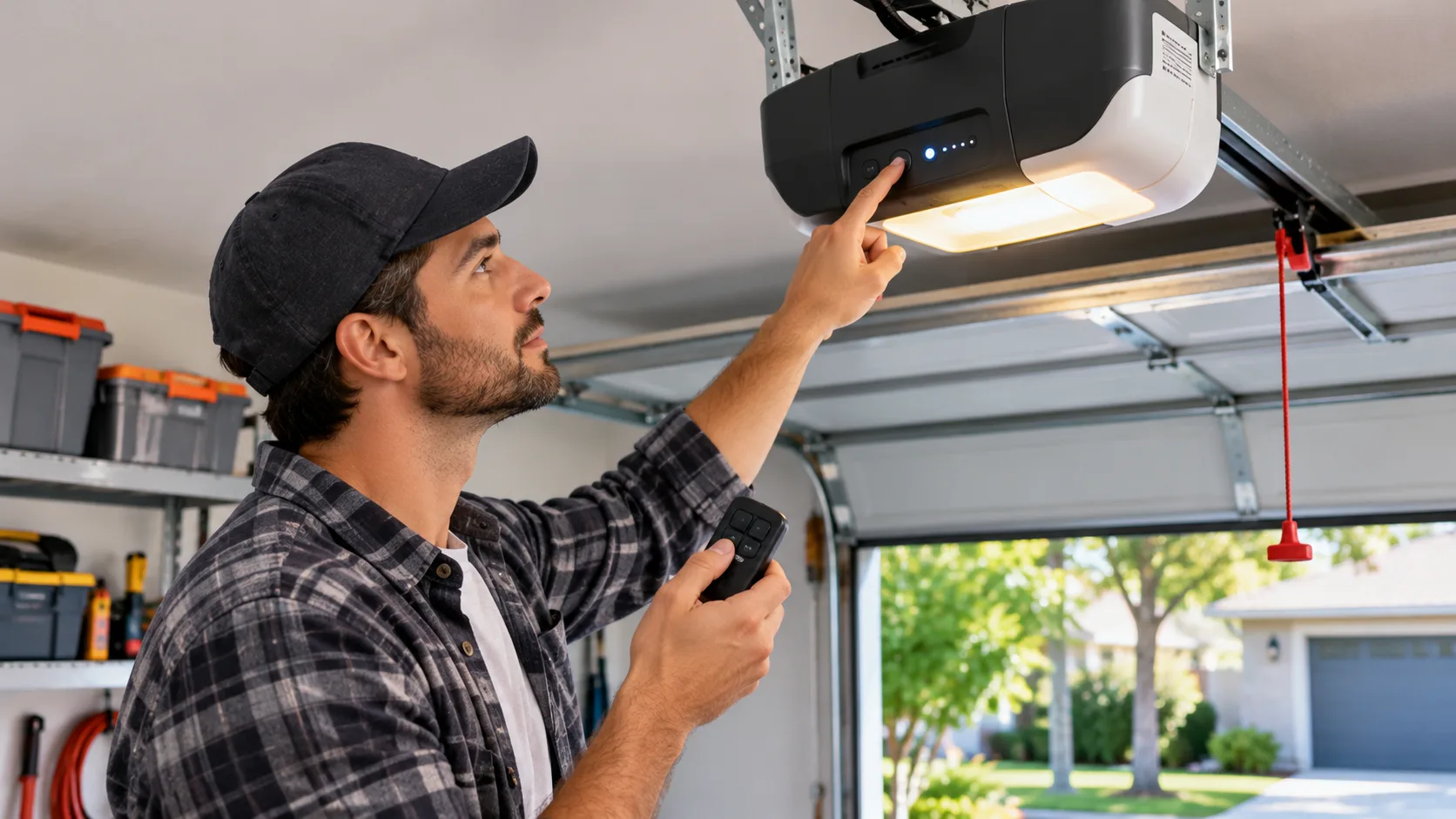
Many garage door openers have a Learn button that activates the system’s wireless programming mode. It is commonly located on the motor unit mounted near the garage ceiling. Depending on the model, you may find it on the rear or side panel, sometimes beneath a removable light cover or near the antenna wire.
The Learn button may have different colors, shapes, and labels depending on the manufacturer. Some models include an indicator light that illuminates or flashes when programming mode is activated. Other systems use a separate programming menu or combination of controls, so the manufacturer’s instructions should determine which button to use.
If the button is difficult to reach, use an appropriate stable ladder on a level surface. Avoid leaning across the garage door tracks or touching nearby electrical connections. You should also avoid pressing and holding unfamiliar controls because some models use extended button presses to erase previously paired accessories or change important settings.
How to Program a Garage Door Opener Remote
Programming a compatible remote usually begins by activating the opener’s learning mode. On many systems, this involves briefly pressing and releasing the Learn button on the motor unit. An indicator light may illuminate or flash, showing that the opener is ready to receive a signal from an authorized remote control.
Next, follow the manufacturer’s instructions for pressing the appropriate button on the new remote. Some models require one press, while others use a particular sequence or confirmation signal. The opener may respond with a flashing light, audible click, or another indicator when the pairing process has been completed successfully.
After receiving confirmation, test the remote from a safe location with the doorway fully visible. Press the programmed button and confirm that the garage door responds normally. If pairing fails, consult the model-specific instructions rather than repeatedly holding buttons, which could unintentionally change settings or erase existing remote connections.
How to Program a Garage Door Keypad
A wireless garage door keypad allows authorized users to operate the door by entering a personal identification number. This can be useful for household members who do not always carry a remote control. Before programming, verify that the keypad supports your opener’s manufacturer, communication system, and security technology.
The setup process generally involves activating the opener’s learning mode and entering a selected PIN on the keypad. Some keypads require an additional confirmation button or manufacturer-specific programming sequence. Follow the supplied instructions carefully because the procedure can differ significantly between wireless keypad models and garage door opener generations.
Choose a PIN that is difficult for others to guess, avoiding obvious combinations such as repeated numbers or easily discovered personal information. After programming, test the keypad while keeping the garage door in clear view. Store the programming instructions securely and avoid sharing access credentials with people who do not need garage entry.
How to Program a Garage Door Opener in Your Car
Many vehicles include a built-in garage door control system that can operate compatible openers without a separate handheld remote. HomeLink is one commonly used example, although other vehicle systems are available. Programming requirements depend on the vehicle model, built-in transmitter, and garage door opener’s wireless technology.
Some vehicle systems begin by learning a signal from an existing authorized remote. The process may then require activating the garage door opener’s Learn button to complete pairing. Other vehicles use digital menus or manufacturer-specific procedures, so it is important to consult both the vehicle manual and the opener documentation.
After pairing, test the vehicle’s garage door control while parked safely outside the door’s movement area. Make sure the entire doorway is visible before operating the system. If the car and opener use incompatible technologies, a manufacturer-approved compatibility accessory may be needed rather than additional programming attempts.
How to Reset a Garage Door Opener Before Programming
Resetting a garage door opener is sometimes necessary when replacing lost remotes, moving into a new property, or managing previously authorized devices. However, a full reset is not normally required when adding one compatible remote. Some reset procedures can remove all stored accessories, requiring each authorized device to be programmed again.
Manufacturers use different methods for clearing wireless remote memory, and these procedures may affect only certain settings. A wireless memory reset is also different from a complete factory reset or an adjustment to the door’s travel settings. Review the official instructions before changing anything to avoid accidentally interrupting normal operation.
Only an authorized homeowner or system administrator should perform access-related resets. If you have moved into a property, confirm ownership or management responsibilities before removing existing access permissions. When in doubt, a qualified garage door technician can help review the equipment and establish an appropriate authorized access configuration.
How to Program a Smart Garage Door Opener
Smart garage door openers allow users to monitor and control compatible systems through connected applications. Depending on the product, features may include door status notifications, remote operation, and access management. Some modern openers include built-in connectivity, while older compatible systems may require an additional smart controller.
Setup commonly involves installing the manufacturer’s application and connecting the supported device to a suitable home network. The app may guide users through device registration, wireless configuration, and garage door identification. Exact steps depend on the hardware, and not every opener supports smartphone control without additional compatible equipment.
Before enabling remote operation, review the manufacturer’s safety and security requirements. Smart garage systems should use strong account credentials, available multifactor authentication, and current software updates. Always ensure that required safety sensors work correctly, and never use remote features to operate a door when unsafe conditions may be present.
Why Your Garage Door Opener May Not Program Correctly
One common reason for programming failure is an incompatible remote control or keypad. Garage door openers use different wireless frequencies, security systems, and communication protocols. A device may look similar to the original remote but still be unable to communicate with the opener, making compatibility checks essential before purchasing replacement accessories.
Weak batteries, electrical interference, and missed programming windows can also prevent successful pairing. Some openers remain in learning mode only briefly before returning to normal operation. If the process does not work, confirm the correct procedure, install a suitable battery, and follow the manufacturer’s timing instructions carefully.
Other problems may involve damaged accessories, faulty receiver components, or existing system errors. If the opener responds to its wired control but not to compatible wireless devices, further diagnosis may be necessary. Avoid opening electrical housings or attempting internal repairs without appropriate training because garage door equipment can present serious hazards.
How to Test Your Garage Door Opener After Programming
Testing confirms that the programmed accessory communicates correctly with the garage door opener. Begin by checking that the doorway is clear of people, pets, vehicles, and other obstacles. Operate the door from a safe location where you can observe the entire movement, and confirm that the remote or keypad produces the expected response.
Next, verify that other authorized controls continue working as intended. If programming involved resetting wireless memory, some previously connected devices may require pairing again. Check each control separately rather than assuming that successful programming of one accessory means the entire access system is functioning correctly.
Garage door safety features also require regular attention, including properly functioning photoelectric sensors and automatic reversal mechanisms. Follow the manufacturer’s recommended inspection and testing procedures. If the door moves unexpectedly, fails to reverse appropriately, or produces unusual noises, stop using it and arrange inspection by a qualified professional.
Garage Door Opener Safety and Security Tips
A programmed garage door opener provides convenient access, but it should also be treated as part of your home’s security system. Keep remote controls in secure locations and avoid leaving them visible inside unattended vehicles. If an authorized remote is lost or stolen, review the manufacturer’s procedures for removing its access.
Garage door systems should also receive regular maintenance to support reliable operation. Keep safety sensors clean and unobstructed, inspect visible components for obvious damage, and follow the manufacturer’s maintenance schedule. Never attempt to adjust garage door springs, cables, or other high-tension components because they can cause serious injuries when handled incorrectly.
Use only compatible accessories and manufacturer-approved configuration methods whenever possible. Avoid sharing keypad codes unnecessarily, and periodically review who has authorized access to connected systems. These simple precautions help maintain security while reducing the risk of accidental operation, equipment problems, and unauthorized entry.
When to Call a Professional Garage Door Technician
Although many programming tasks are straightforward, certain situations require professional assistance. If your opener repeatedly fails to recognize compatible accessories, the problem may involve the receiver, control board, or other components. A qualified technician can examine the system and determine whether programming, repair, or replacement is appropriate.
Professional assistance is also recommended when the garage door does not move smoothly, behaves unpredictably, or has damaged safety equipment. Programming should never be used as a workaround for mechanical problems. Faulty springs, worn cables, damaged tracks, or electrical issues require appropriate inspection and repair before normal operation continues.
Older systems may also need evaluation when replacement remotes are difficult to obtain or modern security features are unavailable. A technician can explain compatible upgrade options and help determine whether replacing the opener makes practical sense. Professional guidance can prevent unnecessary purchases while supporting safe, dependable garage door operation.
Conclusion
Learning how to program a garage door opener is useful when adding a new remote, connecting a keypad, or setting up compatible vehicle controls. Many modern systems use a Learn button or guided pairing process to recognize authorized accessories. Understanding your opener’s specific requirements helps make the procedure easier and reduces avoidable mistakes.
Successful programming depends on device compatibility, correct instructions, and careful testing. Problems such as weak batteries, unsupported remotes, or missed pairing steps can prevent a connection. Following the manufacturer’s guidance and checking that safety features work properly helps maintain reliable performance without unnecessary changes to existing settings.
Regular maintenance and sensible security practices remain important after programming is complete. Protect access credentials, keep remotes secure, and seek professional help when mechanical or electrical problems appear. With the right preparation and a cautious approach, homeowners can manage compatible garage door accessories while maintaining a safer and more convenient access system.
Frequently Asked Questions
How do I program a garage door opener remote?
Most modern openers use a Learn button or programming menu to connect compatible remotes. Activate the pairing mode, follow the manufacturer’s remote instructions, and test the connection safely after confirmation.
Can I program a garage door opener without the original remote?
Many openers allow a compatible replacement remote to be paired without the original handheld remote. However, the exact procedure depends on the model, and authorized access to the opener’s controls is generally required.
Why is my garage door opener not connecting to the remote?
Common causes include an incompatible remote, weak battery, incorrect programming steps, or a missed pairing window. Check the manufacturer’s instructions and verify compatibility before attempting further troubleshooting.
Does programming a new garage door remote erase the old one?
Adding a remote normally does not erase existing connections on many modern systems. However, certain reset procedures clear stored devices, so always check your model’s instructions before pressing and holding programming controls.
Can I program my garage door opener with my smartphone?
Yes, some garage door openers support smartphone control through built-in connectivity or compatible smart controllers. Setup generally requires the manufacturer’s app, supported hardware, secure account configuration, and properly functioning door safety features.